5.3 Isometries & Dilations
Isometry:
In Geometry an Isometry is a transformation of a figure by either a
Translation, Reflection, Rotation or a combination of
Translations/Reflections/Rotations.
Translation:
A Translation is an Isometry, meaning the
Preimage ( original image ) and its translated Image
( what the preimage was changed in to ) are the same shape and size.
A translation ( slide or glide ) shifts every point of a figure the same distance in the same
direction. A figure that is transformed by a translation remains congruent to
its preimage. Its side lengths, angle measures, and other properties remain the
same. Translation changes nothing but the location of a figure.
Example A: Translation
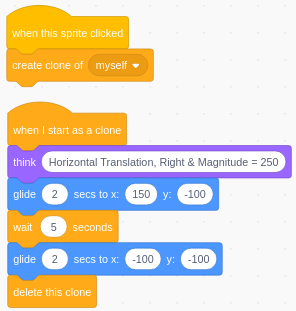
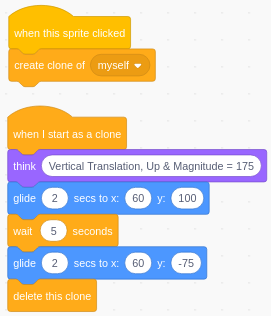
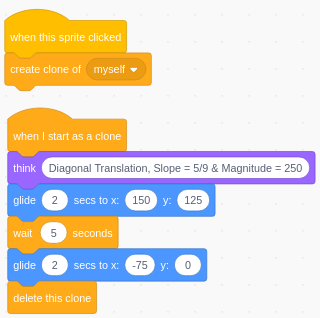
A Translation can be identified by a vector,
which is a quantity that has both magnitude and
direction.
The direction of a vector is the
orientation of the vector, which is determined by the angle
or the slope the vector makes with a horizontal line
going through a point on the preimage to a corresponding point on the
image.
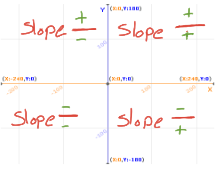
The magnitude of a vector is the
length of a vector, from a point on the preimage to a
corresponding point on the image.
|
|
 |
|
|
Rotation:
A Rotation is an Isometry, meaning the
Preimage ( original image ) and its translated Image
( what the preimage was changed in to ) are the same shape and size.
A rotation ( turn ) is a transformation about a point. A figure that is transformed by a rotation remains
congruent to its preimage. Its side lengths, angle measures, and other properties remain the
same. Rotation changes nothing but the direction of a figure or location and the direction of a figure,
depending upon the point the figure is rotated about.
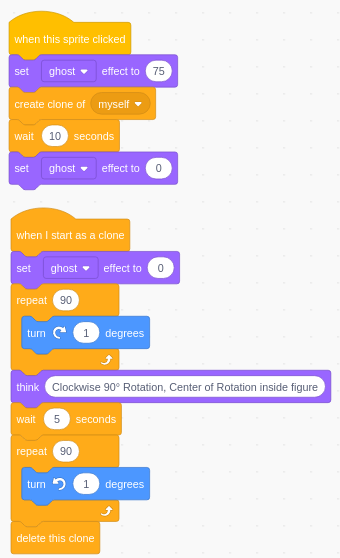
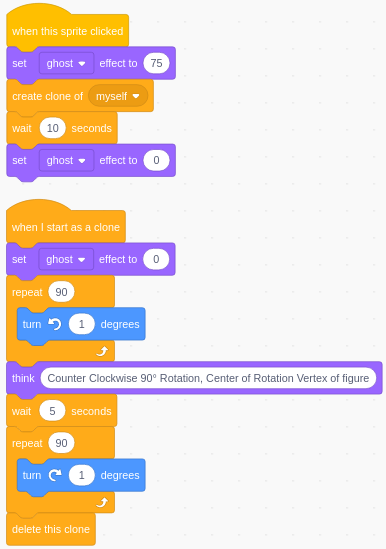
Example B: Rotation
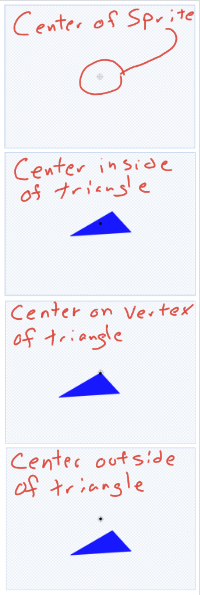
The Center of Rotation is the point that the figure
is rotated about.
There are 3-possible locations of the Center of
Rotation in relation to the figure:
1. The Center of
Rotation is inside of the figure
( think of a wheel on an axle )
2. The Center of
Rotation is a vertex of the figure
( think of the hinge on your Chromebook )
3. The Center of
Rotation is outside of the figure
( think of a child on a swing )
The direction of the rotation can be identified by a Degree
Measure. A Positive Degree Measure would
indicate a Counter Clockwise Rotation of the identified
number of degrees and a Negative Degree Measure would
would indicate a Clockwise Rotation of the identified
number of degrees.
|
|
 |
|
|
Reflection:
A Reflection is an Isometry, meaning
the
Preimage ( original image ) and its translated Image
( what the preimage was changed in to ) are the same shape and size.
A reflection ( mirror image ) is a transformation that reflects every point
in a figure over a given line. Reflection changes nothing but the
orientation of a figure and the location of a figure,
depending upon the reflection line.
Example C: Reflection
The Reflection Line can be thought
of in 2-different ways
1. The Reflection Line is
the Perpendicular Bisector of a
segment from a point on the Preimage to the
corresponding
point on the
Image.
Diagonal Reflection
Line: Identify the preimage coordinate ( x , y )
then identify the coordinate of where you want the image to go.
Find the slope and midpoint, then draw a perpendicular line
through the midpoint.
Horizontal or
Vertical Reflection Line: Identify the distance
( magnitude ) from
the preimage to the image you want. Draw a
perpendicular line, half of the distance from the preimage to the image,
to the intended reflection between the preimage and image.
2. The Reflection Line is one of the sides
of the Preimage.
The Image and Preimage will
share a common side.
|
|
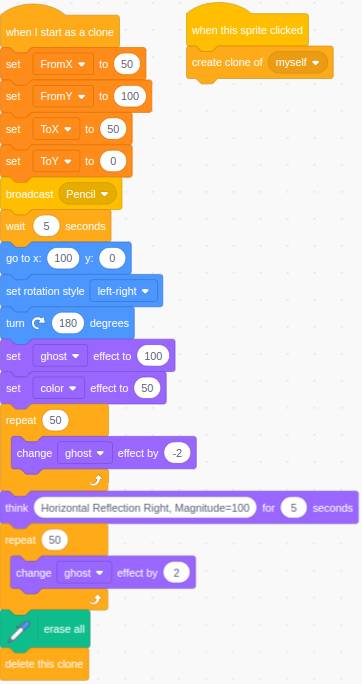 
Note: Due to limitations of Scratch, we are going to
focus on Horizontal Reflections only. |
|
|
Composition of Isometries:
The Composition of two, or more, Isometries is an
Isometry. Recall that
translations, rotations, and reflections are all isometries. A composite
transformation with two or more of these transformations will also be an
isometry.
Example D: Composition of Isometries
While there are many different ways to mix isometries together, we
are going to focus on two.
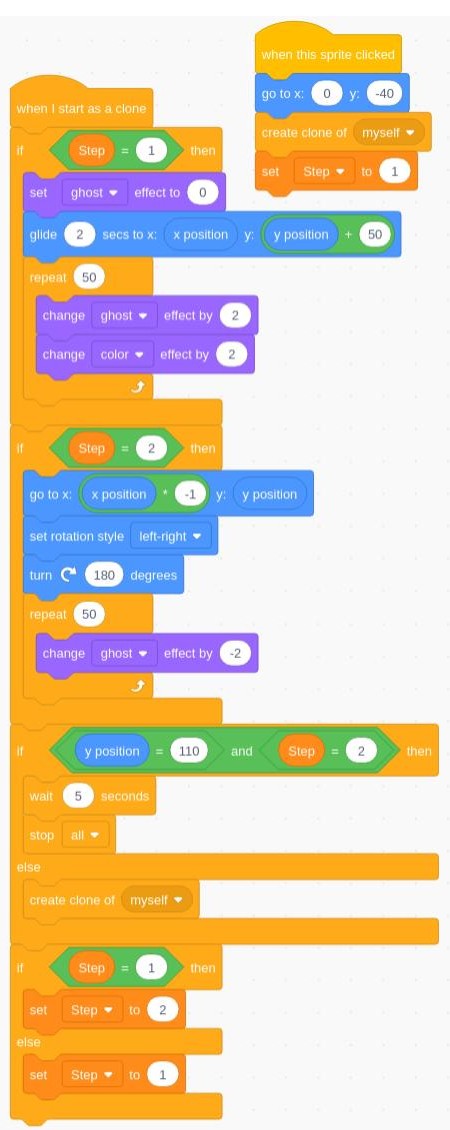
A Glide Reflection is a composition of a translation and a reflection
across
a line parallel to the translation vector. Since a glide
reflection combines
translation and reflection, it is an isometry.
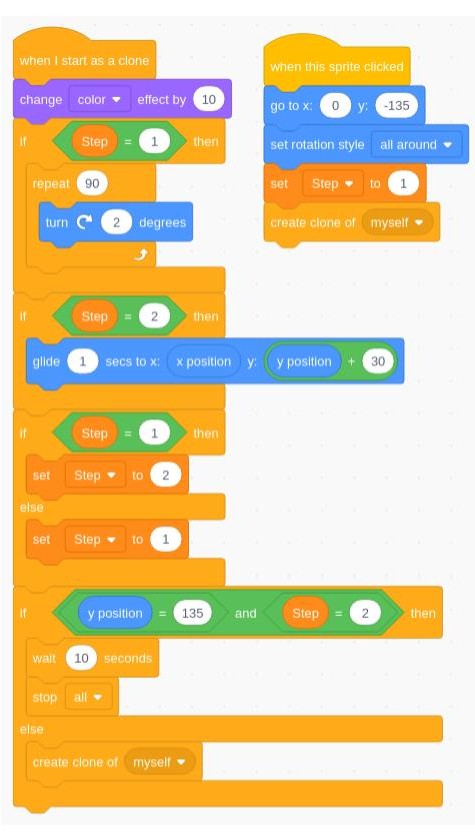
A Tessellation is a repeating pattern of plane figures that
completely covers a plane with no gaps or overlaps. The simplest
kind of tessellation is a regular tessellation: a repeating pattern
of congruent regular polygons.
|
|
Glide Reflection
 |
Tessallation
|
Dilations:
A Dilation maps a figure ( Preimage ) to a
similar figure ( Image ). A dilation is a
Transformation that changes the size of a figure but not its shape. The
multiplier used on each dimension of a figure to change it into a similar figure
is the Scale Factor ( Ratio of Similitude ).
A dilation that results in an image smaller than its preimage
is called a Reduction or a Contraction. A
dilation that results in an image larger than its preimage is
called an Enlargement or an Expansion.
Dilations require a center and a scale factor. The
Center of Dilation is the intersection of lines that connect each point
of the image with the corresponding point of the preimage. A dilation with
a Scale Factor > 1 will result in an image larger than the
preimage and farther away from the center of dilation. A
dilation with a 0 < Scale Factor < 1 will result in an image
smaller than the preimage and between the preimage and the center of
dilation.
Example E: Dilation
Dilations of 2-dimension figures can be used to give the impression
of a 3-dimension object or impression of figures being closer or further
away from the observer.
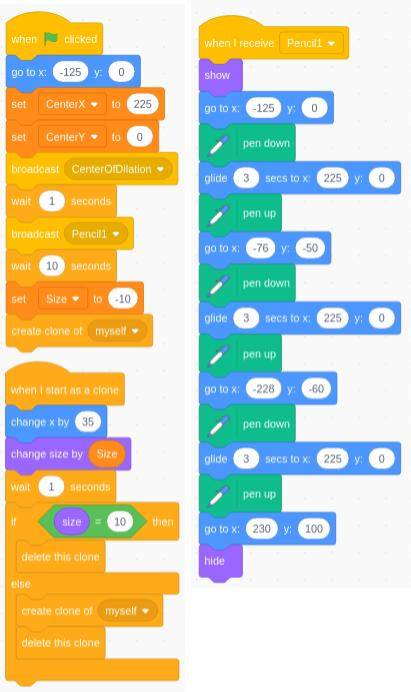
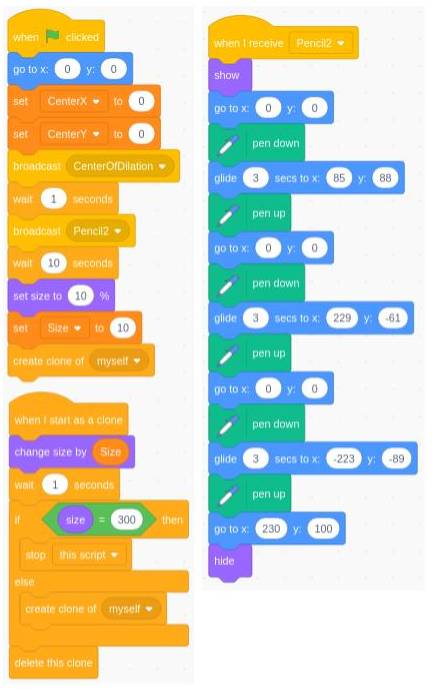
Here we have 2-dimensional figure ( triangle ) being reduced and
moving toward the center of dilation. Giving the observer the
impression of the figure shrinking ( Contraction ) from view.
Then, the 2-dimensional figure appears to move away from the center
of dilation and enlarges ( Expansion ) as it appears to move toward the observer.
|
|
Contraction
 |
Expansion
 |
Scratch
|
Scratch is the world’s largest coding community for children and a coding
language with a simple visual interface that allows young people to create
digital stories, games, and animations. Scratch is designed, developed, and
moderated by the Scratch Foundation, a nonprofit organization. Scratch promotes
computational thinking and problem solving skills; creative teaching and
learning; self-expression and collaboration; and equity in computing. Scratch is
always free and is available in more than 70 languages.
1. Click the link to Scratch -
https://scratch.mit.edu
2. Click on
 ,you will need to
create your own Username & Password ( write it down! ), ,you will need to
create your own Username & Password ( write it down! ),
answer the given questions and use your school email account.
3. After you "Sign In", click on
 to open
your "Stuff" to open
your "Stuff"
4. After you get to your "Stuff", click on
 to
open the editor. to
open the editor.
|
 |
Practice Problems
Take a screenshot of your block code & isomerty then paste it
into your jamboard
A. Create a Translation
of Triangle40
to do the following:
From ( 0 , 0 ),
clone the triangle and translate it...
- Magnitude = 100, Direction =
Horizontal & Right
- Magnitude = 125, Direction =
Vertical & Down
- Magnitude = 75, Direction =
Slope of 2 / 3
- Magnitude = 150, Direction =
Slope of - 3 / 4
|
Notes:
- Create a
called "5.3ppA"
- Download the "Triangle40" sprite, then import
it into Scratch
- Duplicate the "Triangle40" sprite, and then
change the name
of the copy to "TranslationTriangle40"
before you begin.
- Set coordinates to ( 0 , 0 )
- So you have time to get a screenshot, set the "wait seconds"
block as follows:

|
B. Create a Rotation
of
Square40
to do the following:
- Center of
Rotation = Inside, Clockwise
120°
- Center of
Rotation = Vertex, Rotation Degree
Measure = 120°
- Center of
Rotation = Outside, Counter Clockwise
150°
- Center of
Rotation = Outside, Rotation Degree
Measure = -150°
|
Notes:
- Create a
called "5.3ppB"
- Download the "Square40" sprite, then import it
into Scratch
- Duplicate the "Square40" sprite 4-times,
then change the name & the center of the sprite as follows:
-
"RotationCenter", Center = Intersection of the Diagonals
- "RotationVertex", Center = Any Vertex you
choose
- "RotationOutsideCCW", Center =
Dot any where above the Square
- "RotationOutsideCW",
Center = Dot any where below the Square
- Set coordinates to ( 0 , 0 ) & Direction = 90
- Use the "ghost effect" block to fade out the original square
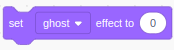 0% fade, 0% fade,
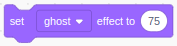 75%
fade 75%
fade
|
C. Create a Horizontal Reflection of Flag100
to do the following:
- From ( -100 , 0 ) To ( 100 ,
0 )
- From ( 150 , -50 ) To ( -150
, -50 )
|
Notes:
- Create a
called "5.3ppC"
- Click:
 to open the extension & add:
- Download the "Flag100" & "Pencil"
sprites, then import it into Scratch
- Duplicate the "Flag100" sprite twice,
then change the name
of the sprite as follows:
- "RotationCenter",
Center = Intersection of the Diagonals
- "RotationVertex",
Center = Any Vertex you choose
- Set coordinates to ( 150 , 0 )
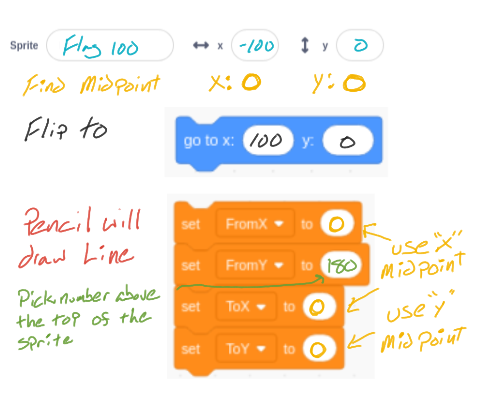
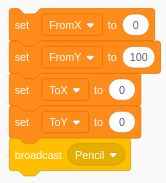
- These blocks will Flip the Flag
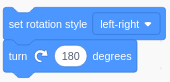
- These blocks will tell the Pencil where to draw the Reflection
Line.
|
D. Create a Glide
Reflection of Trangle40
to do the following:
- Translation: Vertically 50 Pixels from ( 50 ,
-150 )
- Reflection: Over the Y-Axis of 50
pixels
|
Notes:
- Create a
called "5.3ppD"
- Import the "Trangle40 " sprite into Scratch
- Duplicate the "Trangle40 " sprite, and then
change the name
of the copy to "TrangleColor" before you begin.
- Use
 to
color each section of the triangle a different color to
color each section of the triangle a different color
- Create a "New Variable" called "Step"
- The Reflection
Line can be thought of as an imaginary line, so we do
not need to
actually draw it out if we don't want to..
|
E. Create a
Tessellation of Square40
to do the following:
- Translation: Vertically -40 Pixels from ( 0 ,
-150 ) for 8-rows
- Rotation:: 180°
- Translation: Horizontally -40 Pixels for 4 columns
|
Notes
- Create a
called "5.3ppE"
- Import the "Square40 " sprite into Scratch
- Duplicate the "Square40 " sprite, and then
change the name
of the copy to "SquareColor"
before you begin.
- Create a "New Variable" called "Column",
"Row", & "Move"
- Use to
color each section of the square a different color
|
F. Create a
Dilation of Tree100
to do the following:
- Contraction Dilation of 20- trees from ( -250
, 0 ) to ( -3 , 171 )
- Expansion Dilation of 20- trees from ( 3 , 171
) to ( 250 , 0 )
- Maybe even a road...
|
Notes
- Create a
called "5.3ppF"
- Import the "Tree100" & "Road"
sprites into Scratch
- Duplicate the "Tree100" sprite, and then
change the name
of the copy to "Trees"
before you begin.
- Create a "New Variable" called "ChangeX",
"ChangeY",
"Image", & "Size".
You should see the variable "X".
|
Assignment:
Using what you have learned in this lesson, Create the following Isometries & Dilations
A. Create a Translation
of Triangle40
to do the following:
B. Create a Rotation
of
Square40
to do the following:
C. Create a Horizontal Reflection of Flag100
to do the following:
D. Create a Glide
Reflection of Trangle40
to do the following:
E. Create a
Tessellation of Square40
to do the following:
F. Create a
Dilation of Tree100
to do the following: |
Notes:
- Create a
called "5.3ppA"
- Download the "Triangle40" sprite, then import
it into Scratch
- Duplicate the "Triangle40" sprite, and then
change the name
of the copy to "TranslationTriangle40"
before you begin.
- Set coordinates to ( 0 , 0 )
- So you have time to get a screenshot, set the "wait seconds"
block as follows:
|
| |
|
| |
|
| |
|
| |
|
| |
|